Keep your PC safe and updated with “winget”
Windows now has a powerful package manager called winget, which makes it super easy to update all your installed applications with just one click – just like on Linux!

I’ve created a shortcut on my desktop that automatically updates everything silently:
C:\Users\knuds\AppData\Local\Microsoft\WindowsApps\winget.exe upgrade --all --accept-source-agreements --accept-package-agreements --silent
🔒 I run the shortcut as administrator, so it installs updates without asking for permission.
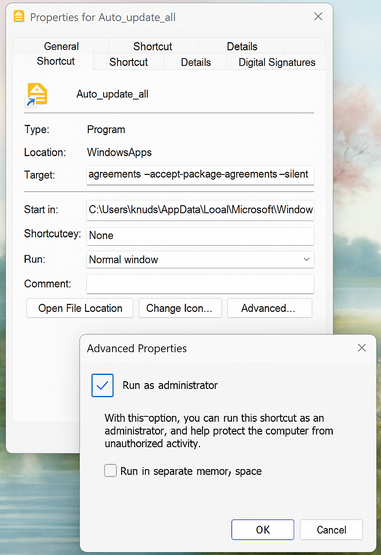
Here’s how it looks:
Exclude programs from updating – like Microsoft Office Enterprise
If your company manages software like Microsoft Office, you don’t want winget to update it. Luckily, you can “pin” apps to prevent updates.
📌 To pin (lock) Office so it won’t update:
winget pin add --id Microsoft.Office
🔓 To unpin (unlock) it again:
winget pin remove --id Microsoft.Office
To see all pinned apps:
winget pin list
Final Tips
✅ Run Windows Update regularly
✅ Use winget upgrade --all to keep your apps secure
✅ Use pinning to protect company-managed software
With this simple shortcut and a few commands, you’ll keep your system secure and fully up to date – with no effort.
You can also use winget to install programs ;O)